Get In Touch
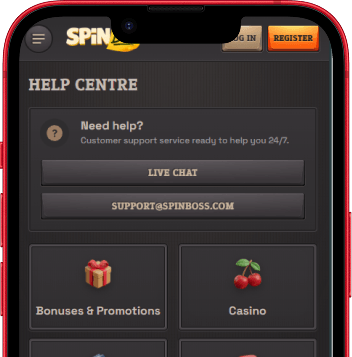
SpinBoss offers two support channels, both running 24 hours a day, 7 days a week. Live chat is the fastest route for anything time-sensitive. Email works better for cases where you need to attach documents or provide detailed context.
Live Chat
Click the chat icon anywhere on the site to open a conversation with a support agent. Typical response time is under 2 minutes. Use this channel for account questions, bonus help, deposit issues, or anything that needs a fast answer. Agents can view your account in real time and resolve most issues during the session.
Open Live ChatEmail Support
Send a detailed message to the support team for cases that require investigation, document submission, or a written record. Response time is within 24 hours. Include your account email address and a clear description of the issue in your message to avoid delays.
| Channel | Hours | Response Time | Best Used For |
|---|---|---|---|
| Live Chat | 24/7 | Under 2 minutes | Account access, bonus activation, urgent payment issues |
| 24/7 | Within 24 hours | Document uploads, complaints, detailed investigations | |
| Phone | Not available | - | - |
Common Support Topics
The support team handles a broad range of requests. Here is a breakdown of the most frequent categories and what they typically cover.
Account Management
Help with login issues, password resets, updating personal details, account restrictions, and profile changes. If you cannot access your account or notice unusual activity, contact live chat immediately.
Payments & Deposits
Questions about failed deposits, pending transactions, payment method eligibility, and balance discrepancies. Support can also check whether a specific payment method is available in your region. For withdrawal details, see the Cashier page.
Bonuses & Promotions
Clarification on bonus terms, wagering status, activation of specific offers, and cancellation of active bonuses. Note that canceling a bonus forfeits the bonus amount and any winnings generated from it. Full details on all current promotions are on the Promotions page.
Technical Issues
Help with games not loading, browser compatibility problems, mobile display issues, and website errors. Providing your browser version, device type, and a description of the issue helps support investigate faster.
Verification & KYC
Guidance on the document submission process, accepted ID types, and verification timelines. KYC is required before your first withdrawal. You can upload documents in the Account Verification section of your profile settings.
Self-Exclusion & Limits
Requests for deposit limits, loss limits, session reminders, or account self-exclusion are handled directly by the support team. These requests are processed promptly. Once a self-exclusion is active, it cannot be reversed until the set period expires.
Before Contacting Support
Quick Checks That Save Time
- Have your account email address ready - agents need it to pull up your account.
- If reporting a payment issue, note the transaction reference number and exact amount.
- For technical problems, try clearing browser cache and cookies, or switch to a different browser.
- Check that your internet connection is stable before reporting site errors.
- If you are using a VPN, disable it - SpinBoss does not allow VPN access and it may cause login or payment issues.
Many common questions about bonuses, withdrawals, and account settings are covered in the FAQ sections across this site. The Promotions page has detailed bonus terms, and the Cashier page covers withdrawal methods, processing times, and limits. Checking there first often resolves questions without needing to contact support.
For technical problems that persist after the standard checks, providing a screenshot of the error is the most efficient way to get a fast resolution from the technical team.
Player Safety & Responsible Gambling
SpinBoss takes player welfare seriously. A range of tools is available to help you stay in control of your gambling activity.
Account Controls
You can set deposit limits, loss limits, and session time reminders directly through your account settings or by contacting the support team. These tools are available to all players at any time, not just those with identified problems. Setting limits proactively is a good habit regardless of how often you play.
Self-Exclusion
If you feel you need a break or want to stop gambling entirely, self-exclusion is available at any time. You can request a temporary break (from 24 hours up to several months) or a permanent account closure. Contact support via live chat or email to start the process. Once a self-exclusion is in place, it cannot be undone until the chosen period expires - reactivation requests made during the exclusion period will be declined.
External Support Organizations
Free, confidential help is available from independent organizations. These services operate separately from SpinBoss and can provide counseling, advice, and practical support:
- GamCare - gamcare.org.uk - Free counseling and practical support for anyone affected by gambling-related harm.
- Gamblers Anonymous - gamblersanonymous.org - Peer support network with meetings available worldwide.
- BeGambleAware - begambleaware.org - Tools, advice, and treatment referrals for people worried about their gambling.
If you are concerned about your gambling or that of someone close to you, reaching out to any of these organizations is a good first step. All services are free and confidential.
Help FAQ
What is the fastest way to contact SpinBoss support?
Live chat is the fastest channel. Click the chat icon on any page and you will typically reach an agent within 1-2 minutes. For issues requiring document submission or a formal record, email is the better option with a response time of up to 24 hours.
How do I request a deposit or loss limit?
Contact support via live chat or email and request the specific limit you want to set - daily, weekly, or monthly. Limits can also be adjusted through your account settings where applicable. Once set, lower limits take effect immediately. Requests to increase a limit may have a cooling-off period before they apply.
Can support cancel an active bonus on my account?
Yes. You can cancel an active bonus from the Profile section of your account, or ask the support team to do it via live chat. Keep in mind that canceling a bonus removes the bonus balance and any winnings produced by it. Only your real-money balance remains after cancellation.
What languages does SpinBoss support in live chat?
The site is available in English, Polish, Finnish, German, Hungarian, Norwegian, Italian, Spanish, Czech, and Portuguese. Live chat agents are primarily available in English, though support in other languages may be available depending on team availability at the time of contact.
What do I do if my complaint is not resolved?
If the initial response does not resolve your issue, ask for your case to be escalated to a senior agent. For disputes that remain unresolved after going through the support process, the Terms and Conditions outline the formal complaint procedure and any applicable alternative dispute resolution options.